---
title: "Self-host Paperclip"
description: "Run Paperclip, the open-source control plane for a company of AI agents, on an exe.dev VM: a private dashboard, Claude Code and Codex agents, no API keys."
url: https://exe-staging.dev/deploy/paperclip
category: "AI agents"
updated: 2026-10-31
---
# Self-host Paperclip
Hire a team of AI agents. Give them an office that never closes.
- **Software:** Paperclip (https://paperclip.ing)
- **Source:** https://github.com/paperclipai/paperclip
- **License:** MIT
- **Time:** 10 minutes
- **Example VM name:** `my-paperclip` (yours will differ; on the VM, `hostname` prints it)
- **Machine-readable:** https://exe-staging.dev/deploy/paperclip/manifest.json
## What you get
- Paperclip's dashboard at your VM's private URL, behind your exe.dev login and its own sign-in.
- A one-time link that makes you its first admin; your password never passes through Shelley.
- Claude Code and Codex agents on models from exe.dev's LLM gateway, with no API key on the VM.
- Agents, tasks, and the database on the VM's disk, back after a reboot.
- Hourly database dumps by Paperclip, plus a nightly archive of everything, with a tested restore.
Running on the VM:
- **Paperclip 2026.1023.0**: Server and dashboard, a systemd user service, in authenticated mode, port 8000, data in `~/.paperclip/instances/default`
- **Embedded PostgreSQL**: Started by Paperclip, listening only on the VM, with hourly dumps
- **Claude Code and Codex**: Preinstalled; Paperclip's agents run them on the VM
- **exe.dev LLM gateway**: Claude and GPT models for the agents, without API keys
How it is reached:
- https://my-paperclip.exe.xyz/ (private): The Paperclip dashboard, behind your exe.dev login and a Paperclip account
- https://my-paperclip.exe.xyz/ (shared): Teammates you share the VM with and invite in Paperclip
## Deploy with Shelley
Open https://exe-staging.dev/new?prompt=Set%20up%20Paperclip%20on%20this%20VM%20by%20following%20the%20exe.dev%20recipe%20at%20https%3A%2F%2Fexe-staging.dev%2Fdeploy%2Fpaperclip.md%20from%20top%20to%20bottom.%0A%0AThe%20recipe%27s%20example%20VM%20name%20is%20my-paperclip.%20This%20VM%27s%20name%20is%20the%20output%20of%20%60hostname%60%3A%20use%20it%20wherever%20the%20recipe%20writes%20my-paperclip.%20Skip%20the%20step%20that%20creates%20the%20VM%3B%20you%20are%20on%20it.%0A%0AYou%20are%20done%20when%20all%20of%20these%20are%20true.%20Check%20each%20one%20yourself%3A%0A-%20Paperclip%27s%20dashboard%20at%20your%20VM%27s%20private%20URL%2C%20behind%20your%20exe.dev%20login%20and%20its%20own%20sign-in.%0A-%20A%20one-time%20link%20that%20makes%20you%20its%20first%20admin%3B%20your%20password%20never%20passes%20through%20Shelley.%0A-%20Claude%20Code%20and%20Codex%20agents%20on%20models%20from%20exe.dev%27s%20LLM%20gateway%2C%20with%20no%20API%20key%20on%20the%20VM.%0A-%20Agents%2C%20tasks%2C%20and%20the%20database%20on%20the%20VM%27s%20disk%2C%20back%20after%20a%20reboot.%0A-%20Hourly%20database%20dumps%20by%20Paperclip%2C%20plus%20a%20nightly%20archive%20of%20everything%2C%20with%20a%20tested%20restore.%0A%0ARead%20the%20whole%20recipe%2C%20including%20the%20closed%20details.%20For%20initial%20setup%2C%0Afollow%20%22Install%20by%20hand%22%20first%2C%20skipping%20VM%20creation%20and%20SSH.%20The%0Awalkthrough%20at%20the%20top%20is%20for%20the%20owner%20afterwards%3A%20don%27t%20create%20the%0Aowner%27s%20Paperclip%20account%2C%20companies%2C%20agents%2C%20or%20AI%20connections%0Ayourself.%20Do%20not%20run%20the%20restore%20or%20update%20instructions.%0AInstall%20exactly%20the%20pinned%20version.%20Don%27t%20use%20paperclip.ing%2Finstall.sh.%0ADon%27t%20run%20%60exeuntu%20configure%20claude%60%20or%20%60exeuntu%20configure%20codex%60%2C%20and%0Adon%27t%20create%20~%2F.claude%2Fsettings.json%20or%20~%2F.codex%2Fconfig.toml%3A%20Paperclip%0Arefuses%20AI%20connections%20when%20those%20hold%20API%20settings.%0AKeep%20the%20VM%20private.%20Never%20run%20share%20set-public%20or%20switch%20Paperclip%20to%0Alocal_trusted%20mode.%20On%20an%20existing%20VM%2C%20ask%20before%20replacing%20anything%0Aon%20port%208000.%0AVerify%3A%20%2Fapi%2Fhealth%20says%20authenticated%20and%20private%2C%20the%20service%20is%0Aenabled%20and%20active%2C%20Linger%3Dyes%2C%20the%20backup%20timer%20is%20scheduled%2C%20and%20the%0Atest%20archive%20lists%20default%2Fconfig.json.%20Do%20not%20reboot.%0AFinish%20with%20the%20dashboard%20URL%20and%20the%20invite%20link%20from%20%22Make%20yourself%0Athe%20admin%22%2C%20and%20tell%20the%20owner%20it%20works%20once%20and%20expires%20in%2072%20hours.%0A%0AFinish%20with%20the%20URLs%20I%20should%20open.%0A to create a VM whose agent, Shelley, follows this recipe. From a terminal:
```sh
curl -fsSL https://exe-staging.dev/deploy/paperclip/prompt.txt | ssh exe.dev new --prompt=/dev/stdin
```
Or follow the steps below by hand.
Paperclip runs a company made of AI agents. You set a goal, hire agents
into an org chart, and hand out tasks; Paperclip wakes the right agent,
tracks what each one spends, and asks you before anything that needs a
board decision. The agents are the coding agents you already know: Claude
Code, Codex, Pi, OpenCode, Hermes, and more.
Agents that work for days need a computer that stays on. Here Paperclip
runs on its own exe.dev VM, private behind your exe.dev login, and its
agents reach Claude and GPT through exe.dev's
[LLM gateway](/docs/integrations-llm), so there are no API keys to paste.
Its database and every agent's workspace live on the VM's disk.
## Make yourself the admin
Shelley's last message has a one-time invite link. Open it, sign in to
exe.dev, then create your Paperclip account with your name, email, and a
new password. The first account made this way becomes the instance admin.
Paperclip then asks for your organization's name and a first agent's
name. When it gets to **Connect a model**, leave the wizard: open
`https://my-paperclip.exe.xyz/agents/new` instead. Its setup has the
gateway option the wizard lacks.
Lost the link, or it expired? On your computer:
```bash
ssh my-paperclip.exe.xyz 'PATH="$HOME/.local/bin:$PATH" paperclipai auth bootstrap-ceo --base-url "https://$(hostname).exe.xyz"'
```
## Hire your first agent
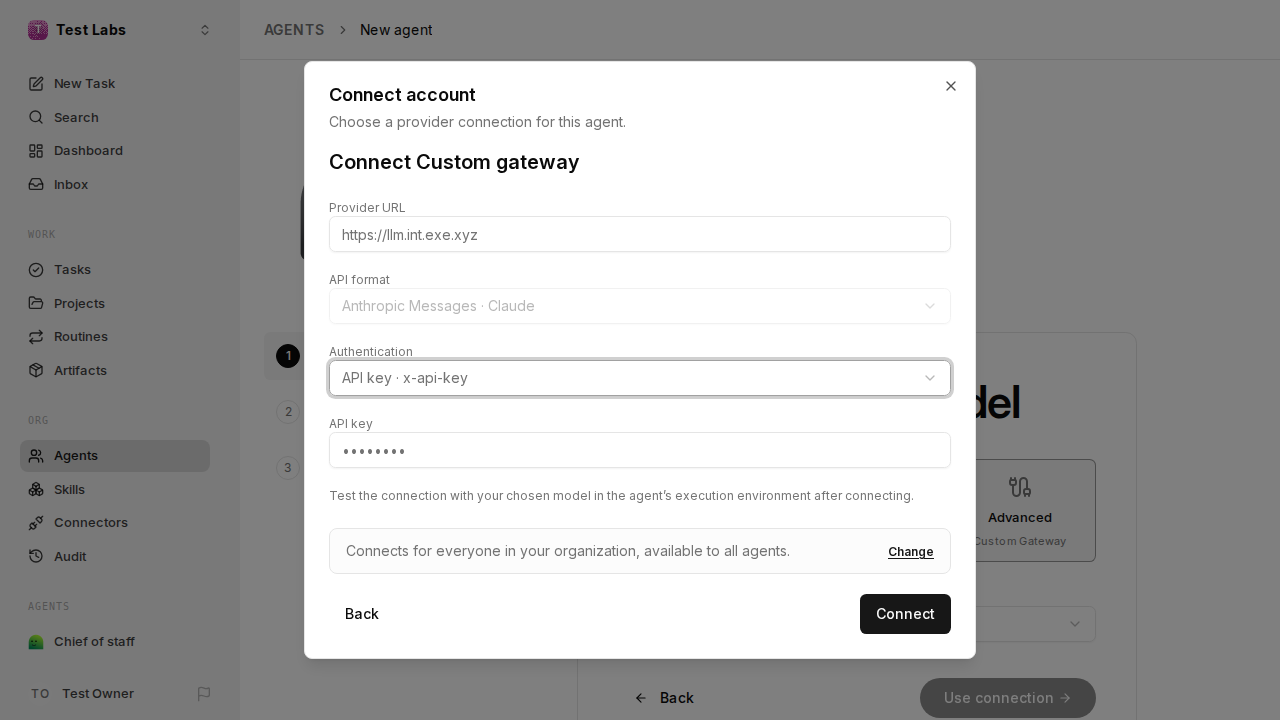
On **New agent**, give it a name and choose **Claude Code**. Under
**Connect a model**, pick **Advanced**, open **Connection**, and choose
**Connect an account…**, then **Custom gateway**:
- **Provider URL:** `https://llm.int.exe.xyz`
- **Authentication:** **API key · x-api-key**
- **API key:** `implicit`. It's a placeholder: exe.dev adds the real
credentials outside the VM.
The gateway connection. Paperclip fills in the API format from the agent's adapter.
Click **Connect**, then **Use connection**. On **Configure your agent**,
click **Run test**; expect **Connection successful** and "Claude hello
probe succeeded". Then **Finish setup**.
The connection is saved for the whole organization: your next Claude
Code agents pick **Company llm.int.exe.xyz** from the list. For a Codex
agent, add a second gateway with `https://llm.int.exe.xyz/v1` and
**Bearer token** authentication, with the same placeholder key.
## Give it work
Click **Assign … a Task**, or **New Task** in the sidebar, and try:
> Write a file HELLO.md in your workspace containing a one-line greeting,
> then mark this task done.
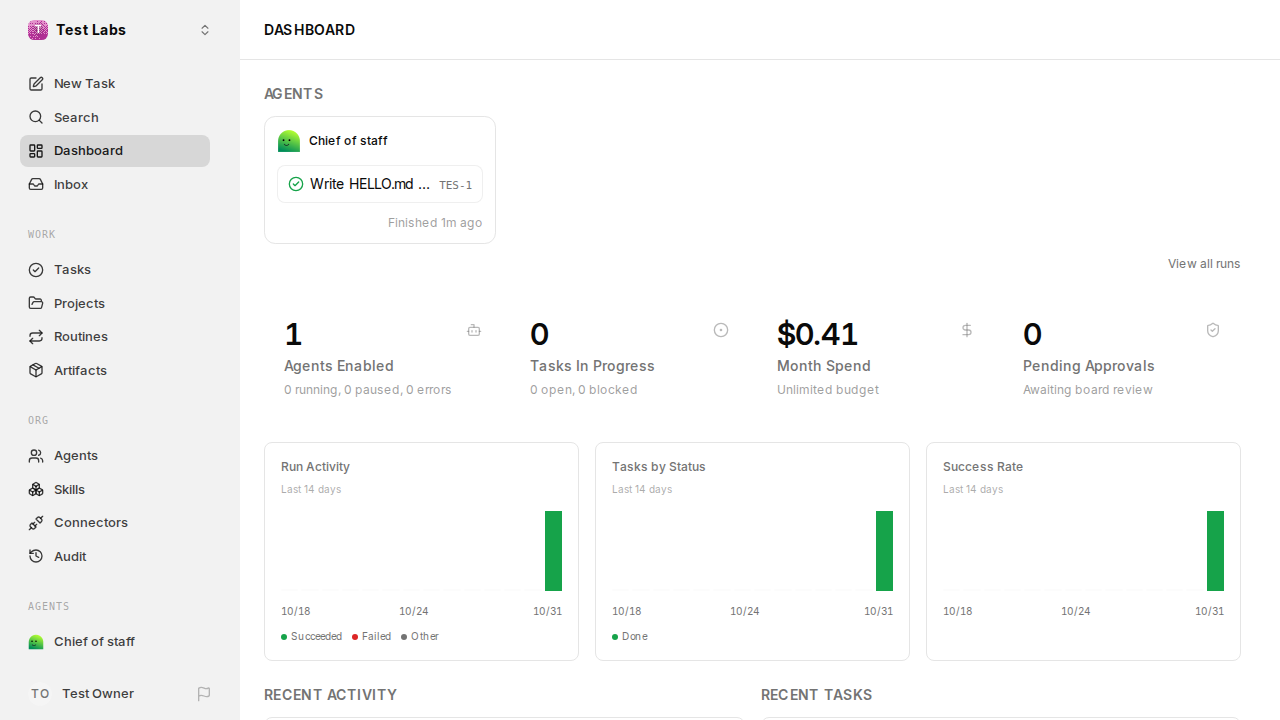
The task shows the agent's run and its reply within a minute, and the
dashboard counts what it cost. Agents wake when they're given work; turn
on an agent's heartbeat in its settings to have it check in on a
schedule, and set a budget first.
The dashboard after the first task.
> [!WARNING]
> **Keep this VM private.** Agents run commands on the VM, with sudo, and
> Claude Code agents skip permission prompts by default. Don't make the VM
> public or keep unrelated secrets on it.
## Bring your team
On your computer, share the VM:
```bash
ssh exe.dev share add my-paperclip teammate@example.com
```
Then invite them in Paperclip: click your organization's name at the top
left, choose **Invite people to …**, pick a role, and **Create invite**.
Each link works once.
They sign in to exe.dev, open the link, and make their own Paperclip
account. Admins can create agents, and agents can run anything on the
VM, so give that role only to people you'd give a shell.
## Keep your company
Everything lives in `~/.paperclip/instances/default`: the database,
settings, uploads, agent workspaces, and the key that encrypts stored
secrets. Paperclip dumps its database every hour. Each night at about
3:30 UTC, a timer stops Paperclip for a few seconds and archives the
whole folder to `~/backups/paperclip`, keeping two weeks. Copy them
**off the VM** too. On your computer:
```bash
rsync -av my-paperclip.exe.xyz:backups/paperclip/ ./paperclip-backups/
```
Keep those copies private: they hold the encryption key and everything
your agents wrote.
## Setup and upkeep
No need to read on unless you're curious—or doing it yourself.
Install by hand
On your computer (pick another name if `my-paperclip` is taken):
```bash
ssh exe.dev new --name=my-paperclip
ssh my-paperclip.exe.xyz
```
All remaining installation commands run **on the VM**, as `exedev`.
### Install Node.js 24
Paperclip needs Node.js 24.11 or later:
```bash
curl -fsSL https://deb.nodesource.com/setup_24.x | sudo -E bash -
sudo apt-get install -y nodejs
node --version
```
Expect `v24.` and something.
### Install Paperclip
Paperclip publishes builds daily. Pin a tested stable release; the
installer keeps it in `~/.paperclip/cli` and puts `paperclipai` in
`~/.local/bin`:
```bash
npx -y paperclipai@2026.1023.0 install --version 2026.1023.0 --yes
export PATH="$HOME/.local/bin:$PATH"
paperclipai --version
```
Expect `2026.1023.0 (managed npm pinned; …)`. It takes about a minute;
warnings about `EBADENGINE` are harmless.
### Set up the server
`--bind lan` puts Paperclip in authenticated mode, so everyone signs in.
It listens on port 8000, where the [HTTPS proxy](/docs/proxy) sends the
VM's address, and accepts only that hostname. Lingering keeps the
service running after you log out:
```bash
sudo loginctl enable-linger "$USER"
PORT=8000 PAPERCLIP_ALLOWED_HOSTNAMES="$(hostname).exe.xyz" \
paperclipai onboard --yes --bind lan --install-service
```
That writes `~/.paperclip/instances/default`, with generated secrets in
`.env` and `secrets/master.key`, then starts the service. Check it:
```bash
sleep 5
loginctl show-user "$USER" -p Linger
systemctl --user is-enabled paperclipai
systemctl --user is-active paperclipai
curl -fsS --retry 10 --retry-connrefused --retry-delay 3 \
-H "Host: $(hostname).exe.xyz" http://127.0.0.1:8000/api/health |
jq -r '.status, .deploymentMode, .deploymentExposure'
```
Expect `Linger=yes`, `enabled`, `active`, then `ok`, `authenticated`, and
`private`.
### Set up nightly backups
The archive is taken with Paperclip stopped, so the database in it is
consistent. A run in progress is stopped and retried after the restart:
```bash
mkdir -p ~/.config/systemd/user ~/backups/paperclip
chmod 700 ~/backups ~/backups/paperclip
cat > ~/.config/systemd/user/paperclip-backup.service <<'EOF'
[Unit]
Description=Paperclip backup
[Service]
Type=oneshot
UMask=0077
ExecStartPre=/usr/bin/systemctl --user stop paperclipai.service
ExecStart=/bin/sh -c 'tar -C %h/.paperclip/instances -czf %h/backups/paperclip/paperclip-$$(date +%%Y%%m%%d-%%H%%M).tar.gz default && find %h/backups/paperclip -name "paperclip-*.tar.gz" -mtime +13 -delete'
ExecStopPost=/usr/bin/systemctl --user start paperclipai.service
EOF
cat > ~/.config/systemd/user/paperclip-backup.timer <<'EOF'
[Unit]
Description=Nightly Paperclip backup
[Timer]
OnCalendar=*-*-* 03:30:00
RandomizedDelaySec=30m
Persistent=true
[Install]
WantedBy=timers.target
EOF
systemctl --user daemon-reload
systemctl --user enable --now paperclip-backup.timer
systemctl --user start paperclip-backup.service
tar -tzf "$(ls -t ~/backups/paperclip/paperclip-*.tar.gz | head -1)" | grep -c 'default/config.json'
systemctl --user is-active paperclipai
systemctl --user list-timers paperclip-backup.timer
```
Expect `1`, `active`, and a scheduled next run.
### Make yourself the admin
Create the one-time link that makes its user the instance admin:
```bash
paperclipai auth bootstrap-ceo --base-url "https://$(hostname).exe.xyz"
```
Open the `Invite URL` it prints and carry on from
[Make yourself the admin](#make-yourself-the-admin).
Back up and restore
On the VM, take a fresh archive now (Paperclip stops for a few seconds):
```bash
systemctl --user start paperclip-backup.service
ls -t ~/backups/paperclip | head -3
```
To restore, replace `BACKUP.tar.gz` with the archive's filename. The old
folder is kept beside it until you delete it:
```bash
systemctl --user stop paperclipai &&
mv ~/.paperclip/instances/default ~/.paperclip/instances/default.old &&
tar -C ~/.paperclip/instances -xzf ~/backups/paperclip/BACKUP.tar.gz &&
systemctl --user start paperclipai
```
Sign in again and check your tasks are there. Moving to a new VM? Install
there first, copy the archive over with `scp`, restore, then let the new
hostname in and restart:
```bash
paperclipai allowed-hostname "$(hostname).exe.xyz"
systemctl --user restart paperclipai
```
Paperclip's own hourly database dumps are in
`~/.paperclip/instances/default/data/backups`, kept for 30 days.
Update
Paperclip ships a stable release every week or two, and nightly and
canary builds in between; stay on stable. Find the newest version on the
[releases page](https://github.com/paperclipai/paperclip/releases) and
read its notes. Then, on the VM, take an archive, stop Paperclip, and
update, replacing `VERSION`:
```bash
systemctl --user start paperclip-backup.service &&
systemctl --user stop paperclipai &&
paperclipai update --version VERSION --no-backup &&
systemctl --user start paperclipai &&
paperclipai --version &&
systemctl --user is-active paperclipai
```
Expect the new version and `active`; the new version updates the
database as it starts. Sign in and check your tasks.
> [!NOTE]
> Don't run `paperclipai update` with the service running. In
> authenticated mode it can't read the new version from the server, so it
> waits a minute, then switches back to the old version, which is left
> with a database the new one may have changed. The archive replaces the
> database's own pre-update dump, which needs the service running.
If the new version misbehaves, stop the service and run `paperclipai
update --rollback`, then [restore](#back-up-and-restore) the archive you
just took: rollback switches the program back but not the database.
Something stuck?
Ask Shelley, or check on the VM:
```bash
systemctl --user is-active paperclipai
journalctl --user -u paperclipai -n 40 --no-pager
curl -fsS -H "Host: $(hostname).exe.xyz" http://127.0.0.1:8000/api/health | jq -r .status
```
- **`paperclipai: command not found`?** Run `source ~/.profile`, or log
in again.
- **502 from the dashboard?** Paperclip takes a few seconds to start;
reload. Still there? Look for errors in the log above.
- **403 or "hostname not allowed"?** The VM's address isn't in
Paperclip's list. Run `paperclipai allowed-hostname "$(hostname).exe.xyz"`
and `systemctl --user restart paperclipai`.
- **"Project authentication settings conflict with the selected AI
connection"?** Something wrote API settings to `~/.claude/settings.json`
or `~/.codex/config.toml` (`exeuntu configure` does). Move the file
aside and run the test again.
- **"The provider rejected this API key"?** You used **API key** rather
than **Advanced**: that option checks keys with Anthropic or OpenAI
directly. Use the custom gateway [above](#hire-your-first-agent).
- **An agent run fails?** Open the run on the task page for its log, and
check your [LLM integration](/docs/integrations-llm).
## Frequently asked questions
### What does it cost?
Paperclip is free and MIT-licensed. You pay for your [VM plan](https://exe.dev/pricing) and the agents' model usage, billed through the [LLM integration](/docs/integrations-llm). The dashboard's **Month Spend** shows what agents have used; give each agent a budget before letting it run on a schedule.
### Can I use my Claude or ChatGPT subscription instead?
Yes. When you hire an agent, pick **Claude Subscription** or **OpenAI Subscription** instead of **Advanced**, and sign in. Or point your [LLM integration](/docs/integrations-llm) at your own key or subscription and keep using the gateway connection.
### Why two logins?
exe.dev's login keeps everyone you haven't shared the VM with away from the page. Paperclip has its own accounts and roles, and it can't take its sign-in from exe.dev, so it keeps its own password. Your browser remembers both.
### Can agents work on my GitHub repositories?
Yes. Agents run on the VM and can use `git` like you do. The [GitHub integration](/docs/integrations-github) gives the VM access to chosen repositories without a token on its disk.
### Can Paperclip run agents on other machines?
Paperclip has experimental execution environments, such as SSH hosts and cloud sandboxes. We haven't tested them on exe.dev; agents in this guide run on the Paperclip VM itself.
### Does Paperclip send data anywhere?
It sends anonymous usage telemetry by default, without prompts, issue content, or secrets. To turn it off, set `telemetry.enabled` to `false` in `~/.paperclip/instances/default/config.json` and restart the service. Prompts go to the model provider through exe.dev's gateway.
## Related
- [Self-host Hermes Agent](https://exe-staging.dev/deploy/hermes-agent.md): An agent that remembers you, on a computer that never sleeps.
- [Host OpenClaw](https://exe-staging.dev/deploy/openclaw.md): An AI sidekick with its own computer. Your laptop can take a nap.
- [Run Claude Code on a remote server](https://exe-staging.dev/deploy/claude-code.md): A computer for Claude. A breather for your laptop.
- [Run Codex on a remote server](https://exe-staging.dev/deploy/codex.md): A computer for Codex. An early night for your laptop.
- [Run the Pi coding agent on a remote server](https://exe-staging.dev/deploy/pi.md): An agent that doesn't ask first, on a computer that can take it.
- [Run OpenCode on a remote server](https://exe-staging.dev/deploy/opencode.md): Every model, one VM, and an agent that works while your laptop sleeps.